CygNet Broadcast
Administrators can submit messages to the GNS via script that will be sent out to all open HMI clients: CygNet Studio and CygNet Vision. These messages, such as upcoming outages or important system information, display across the top of the application window inside the specific CygNet clients. Messages have both a start and end date, so you can schedule them for the future and have them disappear when they are no longer relevant.
The broadcast messages are stored and distributed by the General Notification Service and can be created via script using methods in the CxGNS COM API. The feature is disabled by default and enabled via keywords in your Gns.cfg file. You can also choose to optionally report all messages to the Audit Service.
Broadcast messages are displayed in a blue notification bar under the menu bar in the CygNet Studio and CygNet Vision user interface. A message will be visible until the configured date range has expired. Once expired, the message will disappear, or you can clear all broadcast messages. The following image shows a sample CygNet Studio screen that could be used to create and broadcast a message to other CygNet Studio or Vision clients.
|
CygNet Studio Broadcast |
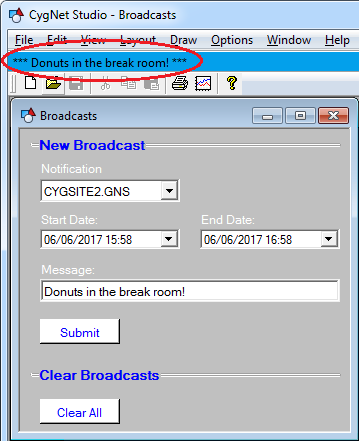
CygNet Broadcast is enabled in the GNS via the following service configuration keywords, and implemented via the CxGns COM API.
| Keyword | Required | Description | Default | Options |
|---|---|---|---|---|
|
ENABLE_BROADCAST |
No |
Enables the broadcast message feature for the GNS. |
FALSE |
TRUE, FALSE |
|
BROADCAST_REFRESH_RATE |
No |
Specifies how often clients will check with the GNS for new broadcast messages in seconds. If you have multiple broadcast-enabled GNS services on the same domain, clients will use the shortest refresh rate. |
60 |
|
|
REPORT_TO_AUDIT |
No |
Writes all CygNet Broadcast messages to the Audit Service. |
FALSE |
TRUE, FALSE |
Once you have a GNS that is broadcast-enabled, all you need to do is submit a broadcast. The components of a broadcast are: start date, end date, and message. Start and end date allow you to display your broadcast only during a specific window of time. Once the end date has passed, the broadcast will disappear.
CygNet Broadcast can be used in a multi-site and replicated environments. In a multi-site environment, if there are different refresh rates between the different GNS services, then the shortest rate will be used. In a redundant environment, both production and replicated GNS services need to be configured to broadcast messages.
The clients will only check for broadcasts once, if the feature is disabled. If, at some point in the future, the service keywords are enabled and the GNS restarted, the clients will still not check for new broadcasts without being closed and restarted.


